
Measure Sound Better
Decoding Bluetooth Audio Technologies: How A2DP, HFP, and AVRCP Work Together

When we use Bluetooth headphones to listen to music, we rarely stop to consider what is happening behind the scenes. How does music stream smoothly and reliably? How do buttons instantly control playback? And how does the system seamlessly switch to call mode when a phone call comes in?
What appears to be a simple user experience is in fact enabled by three core profiles of Classic Bluetooth: A2DP (Advanced Audio Distribution Profile), HFP (Hands-Free Profile), and AVRCP (Audio/Video Remote Control Profile).
This article explains how these three profiles operate collaboratively through two typical scenarios: music playback and voice calls.
Music Playback Scenario: A2DP and AVRCP
In a music playback scenario, the system must accomplish two primary tasks. The first is to transmit continuous audio data to the playback device in a stable manner, which is handled by A2DP. The second is to allow user control actions such as play, pause, and track switching, which is handled by AVRCP.
A2DP: How Audio Data Is Delivered
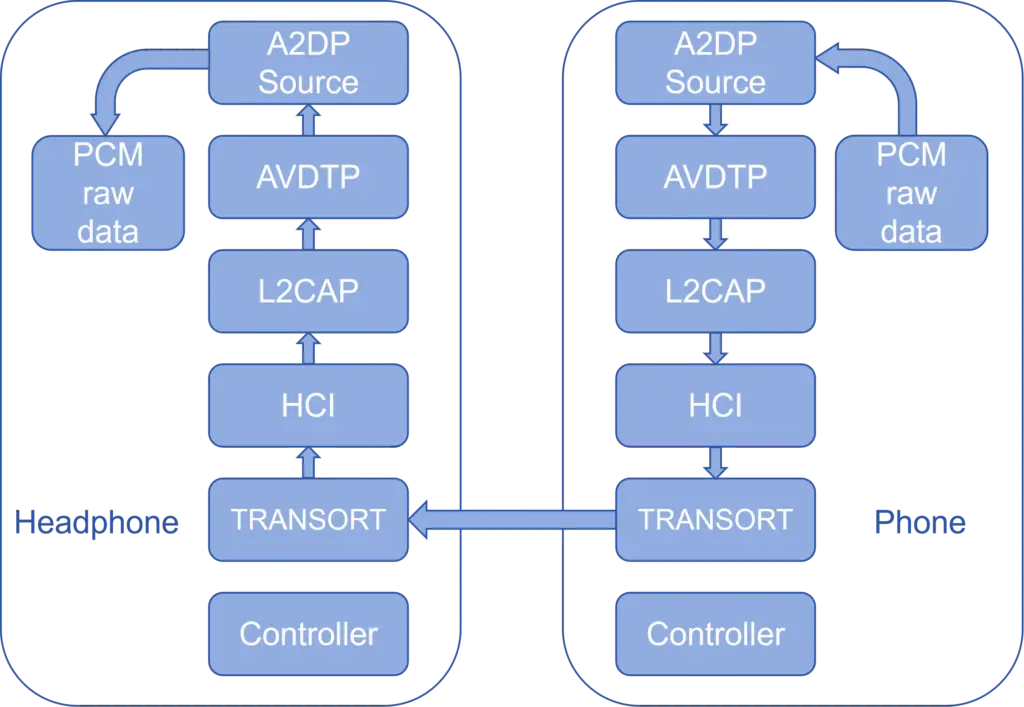
A2DP is a unidirectional audio streaming profile. Using music playback from a smartphone to Bluetooth headphones as an example, the phone first feeds audio data in PCM format into an encoder. The encoded audio frames are transmitted by the A2DP Source, encapsulated using AVDTP (Audio/Video Distribution Transport Protocol), segmented into ACL packets by L2CAP, and then passed downward through HCI (Host Controller Interface) and the lower transport layers to the controller, where they are sent over the air via RF.
On the headphone side, the process is reversed. After the controller receives the data, it is passed up the protocol stack. Once L2CAP and AVDTP decapsulation is complete, the A2DP Sink forwards the audio data to the decoder, restoring it to PCM format. Finally, the PCM signal is converted by the DAC and output to the headphone speakers.
A2DP Codec Comparison: Balancing Audio Quality and Latency
In music playback, the choice of codec is often the most noticeable factor affecting user experience. Different codecs vary significantly in bitrate, latency, and link robustness. The table below compares commonly used A2DP codecs (actual values may vary depending on implementation and system strategy).
| Codec | Common bit rate | typical end-to-end delay | Sound Quality Characteristics |
| SBC | 192–328 kbps | 200–250 ms | Basically acceptable |
| AAC | ~128 kbps | 150–200 ms | Better perceived audio quality |
| aptX | 352 kbps | 120–150 ms | Improved dynamics and clarity |
| aptX HD | 576 kbps | 150–200 ms | High quality, low distortion |
| LDAC | 330–990 kbps | 200 ms | High theoretical quality ceiling |
| LHDC | 400-900kbps | 150–200 ms | Better high-frequency detail retention |
As shown above, a higher bitrate does not necessarily guarantee a better overall experience. In complex RF environments or under fluctuating link quality, high-bitrate codecs are more prone to stuttering or retransmissions, which can degrade perceived performance. Therefore, codec selection should be evaluated comprehensively based on application scenarios and test results.
AVRCP: Control Functions During Music Playback
Operating in parallel with A2DP, AVRCP is responsible for control interactions. Functions such as play, pause, track switching, and volume adjustment are all implemented through AVRCP commands transmitted over a dedicated control channel.
In real-world usage, AVRCP-related issues often manifest as slow response times or poor state synchronization, such as volume mismatch, delayed button responses, or incorrect media information display. Although these issues do not directly affect audio quality, they can significantly impact overall user experience and should receive particular attention during system validation.
Voice Call Scenario: HFP and AT Command Control
When the system switches from music playback to a voice call, A2DP is suspended and HFP takes over both audio transmission and control.
HFP: Establishment and Operation of the Real-Time Voice Link
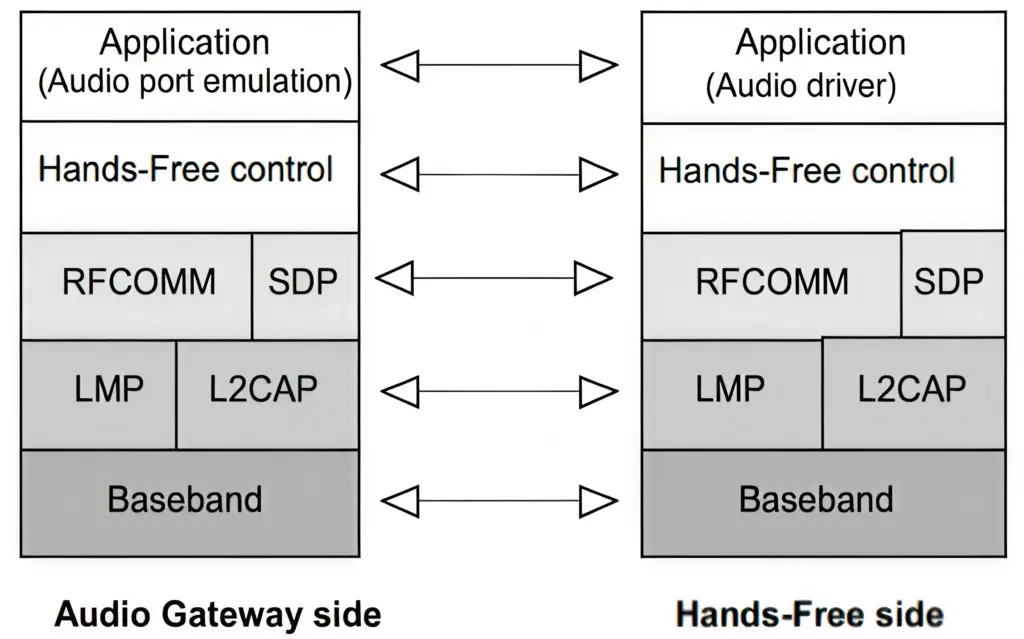
HFP supports bidirectional voice communication. At call setup, a dedicated SCO or eSCO link is established for voice data transmission. On the headset (HF) side, the microphone captures analog voice signals, which are first converted into PCM data. The PCM audio is then encoded using CVSD or mSBC. Unlike A2DP audio, HFP voice frames do not pass through L2CAP; instead, they are directly encapsulated into SCO or eSCO packets and transmitted via HCI and the lower transport layers to the controller, where they are sent over RF.
On the phone (AG) side, the received data follows the reverse process to reconstruct PCM audio. The downlink audio path from the phone to the headset follows the same mechanism in the opposite direction.
AT Commands: Where Call Control Comes From
In voice call scenarios, there is no separate control profile equivalent to AVRCP. Functions such as answering, hanging up, rejecting calls, and call state notifications are all implemented through AT commands.
This text-based command mechanism simplifies call control logic, but during testing it is essential to pay close attention to command timing and state synchronization to ensure reliable behavior.
HFP Codec Comparison: CVSD vs. mSBC
HFP supports two codecs: CVSD and mSBC. Their characteristics are compared below.
| Codec | Sampling Rate | Typical Latency | Audio Characteristics | Use Case |
| CVSD | 8 kHz | <100 ms | Narrowband speech | Compatibility-focused |
| mSBC | 16 kHz | ~100 ms | Wideband speech, clearer | Higher call quality requirements |
Compared with A2DP codecs, HFP codecs prioritize speech intelligibility and real-time performance, trading off frequency response range and retransmission capability to achieve lower latency.
Summary
A2DP, AVRCP, and HFP are not isolated protocols. Instead, they work together dynamically based on usage scenarios. During music playback, A2DP handles audio streaming while AVRCP manages control. When a call occurs, HFP assumes responsibility for both voice transmission and control, using AT commands for state management.
If you are involved in the development or testing of Bluetooth audio products and would like to learn more about how to validate these profiles, you can find information on the CRY576 and CRY578 Bluetooth adapters at www.crysound.com.cn. You are also welcome to contact the CRYSOUND team at Zhaohua Electronics; we can provide demonstrations and product recommendations tailored to your testing requirements.